
IMDb: Movies & TV Shows
IMDbEntertainment
4.366.74K Reviews
- Version
- 9.3.4.109340300
- Installs
- 100.00M
- Age Rating
- Teen
Screenshots
Our Review of IMDb: Movies & TV Shows
 Analysis by Appyee
When I am choosing what to watch, I want more than another shelf of posters: I need a quick way to compare titles, remember recommendations, and check who made something. That is the role IMDb: Movies & TV Shows fills for me. It is an entertainment app from IMDb, and I find it most useful as a guide alongside streaming services, rather than as a place to watch films or series.
That distinction matters when deciding whether to install it. The app is free, has a Teen content rating, and has been available since June 29, 2010. Its current version is 9.3.1.109310300 and it requires iOS or Android 11 or later. IMDb has a 4.4 average from around 967,000 ratings, with over 100 million installs. Those figures suggest broad use, but the practical question is whether its mix of discovery and reference information matches how you choose entertainment.
Start with the decision you need to make
If I already know what I want to watch, I usually go straight to the service that carries it. IMDb is more helpful earlier in the process: when a friend mentions a film, when I want to check whether a new season is on the way, or when I have a free evening and no clear choice. Its strength is bringing title information, audience response, discovery, and personal organization into one place.
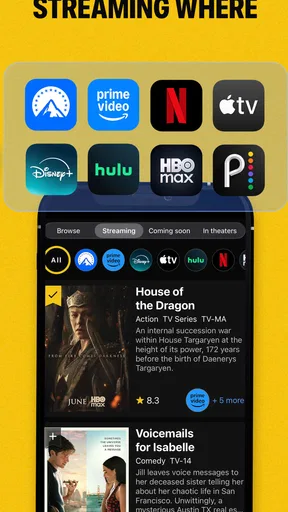
I would also separate “help me choose” from “tell me where to watch.” The app can help me assess a title, but availability can differ between services and over time. I treat IMDb as a research stop, then confirm the actual viewing option in the streaming app I use. That small extra step prevents the familiar frustration of deciding on a film only to find it is not available where I expected.
Discovering Content with IMDb
When you first open the app, you're greeted with a clean and intuitive interface that makes navigation a breeze. The home screen is packed with trending movies and series, making it easy to discover what's hot right now. Whether you're a fan of thrillers or rom-coms, there's something for everyone.
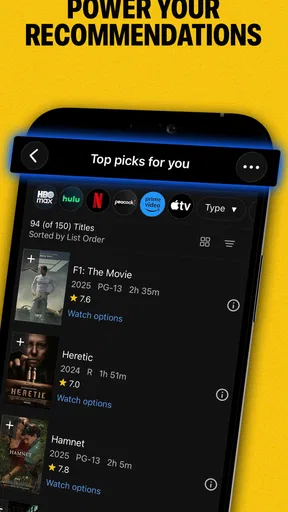
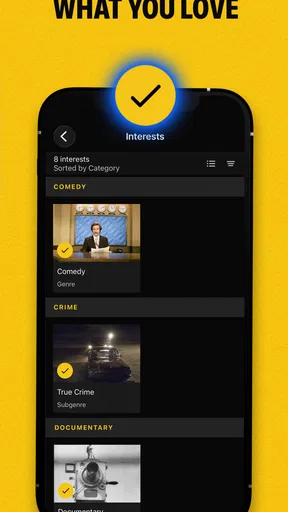
One of my favorite features is the personalized recommendations. The app takes into account your viewing history and ratings to suggest content you'll likely enjoy. It's like having a movie buff friend who just gets your taste. The IMDb app makes finding your next binge-watch session super easy.
Where its reference strength pays off
If you're like me and love diving deep into the nitty-gritty details, the app's comprehensive database is a goldmine. From cast lists and crew information to trivia and goofs, it's all at your fingertips. Ever wondered about the filming location of your favorite scene? IMDb's got you covered.
The app also provides detailed reviews and ratings from both critics and users. It’s a great way to gauge if a movie or show is worth your time. I often find myself reading user reviews before hitting play, and it's saved me from quite a few duds!
One useful habit is to use those details to answer a specific question, rather than trying to read everything on every title page. If a familiar actor appears in a new show, I can check the cast and follow a trail of earlier roles; if a film feels familiar, the crew information can help me identify the connection. Trivia and goofs are enjoyable after watching, but I avoid them beforehand if I want to keep surprises intact.
Ratings are best treated as a signal, not a verdict. A high score can help me shortlist something, while reviews can reveal whether the appeal depends on a particular genre or style. I do not let a single negative comment decide for me: people may object to exactly the slow pacing, odd humor, or bleak tone that I enjoy. Checking a handful of reactions is more useful than getting trapped in a long review-reading detour.
Trailers, news, and the notification trade-off
Another fantastic feature is the constant stream of trailers and entertainment news. Want to know about the latest blockbuster in the making or catch a sneak peek of an upcoming series? The app keeps you updated with the freshest trailers and news articles, so you're always in the loop.
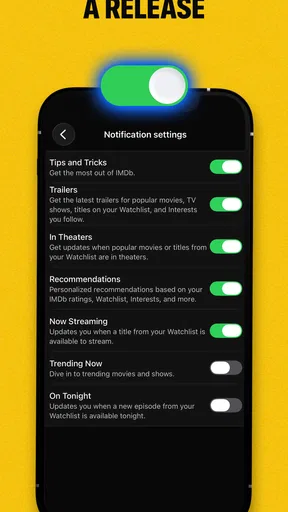
I particularly enjoy the notifications for new trailers. It's like getting a little gift of excitement every time a notification pops up. Plus, the news section is perfect for those who love staying informed about the entertainment industry.
There is a trade-off here: frequent updates are useful if I actively follow upcoming releases, but they can pull attention away from the simple task of picking tonight’s film. I would be selective about notifications and treat the news feed as something to browse when I am curious, not as a checklist to keep up with. A trailer can also set expectations strongly, so I sometimes prefer to check the cast and premise first and watch the preview only when I am still undecided.
Lists that turn browsing into a plan
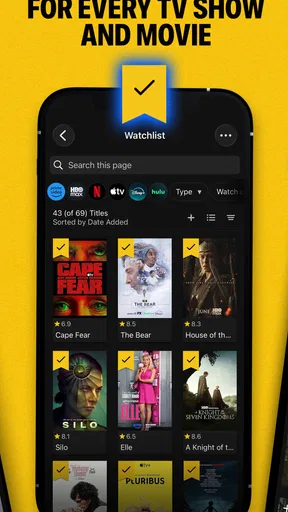
IMDb isn't just an app; it's a community. You can join discussions, rate movies, and even create your own watchlists. The ability to make lists is a lifesaver for someone as indecisive as I am. Whether it's a list of movies to watch over the weekend or a "must-watch" series list, having everything organized is incredibly satisfying.
The community aspect also means you can see what others are watching and recommending. It's like a social network for movie buffs, and I love contributing my own two cents on films I've watched.
My most practical use for a watchlist is capturing a recommendation at the moment I hear it. If a colleague mentions a documentary during lunch, I can save the title instead of trusting myself to remember it later. When I have time to choose, I can revisit that shortlist and compare a few candidates. To keep the list useful, I would remove titles after watching them or split broad interests into smaller lists; otherwise, a long backlog can become another source of indecision.
For an ordinary evening, I might have twenty minutes before friends arrive and need a film suggestion that suits the group. I can look at a few titles, compare their ratings and cast, and check reviews for clues about tone. Then I take the chosen title to a streaming service to see whether it is available. IMDb does not remove every step, but it makes the decision more informed and gives me a place to keep the runners-up for another night.
When another kind of app is a better fit
Compared with opening several streaming apps and browsing their individual catalogs, IMDb is better when I want a broader view of a title or need context that a viewing service may not emphasize. It is also handy for tracing actors, filmmakers, and related work. But if my main question is simply “What can I play here and now?”, the streaming service itself is the more direct choice because it shows its own available catalog and starts playback.
Dedicated film-tracking or social apps may suit someone whose priority is logging every watch, building a highly personal diary, or keeping conversation with a close circle at the center. IMDb’s appeal is its combination of reference material, ratings, discovery, and lists. I would not switch to it expecting every community interaction to feel intimate, nor would I choose it as a substitute for a service designed around playback. It works best as the layer between hearing about a title and deciding what to do with that recommendation.
For parents choosing something to watch with younger viewers, the Teen rating is worth noticing, but I would still check the details of each individual title. A general app age rating does not tell me whether a particular movie fits a family’s preferences. The same caution applies to user reviews: they can offer perspective, but I use them as one input rather than a substitute for checking content and tone myself.
What to expect before making it part of your routine
The main cost of switching to IMDb is not money; it is attention and habit. If I already keep a reliable watchlist elsewhere, maintaining two lists can create unnecessary housekeeping. I would pick one place as the source of truth, then use IMDb for the research it handles well. If I have no system at all, starting with a short list of things I genuinely plan to watch is more useful than saving every interesting title I encounter.
It is also worth deciding how much detail you actually want. IMDb can reward curiosity with cast, crew, trivia, reviews, and news, but that abundance can turn a quick decision into a browsing session. When I am short on time, I set a limit: check the premise, scan a few ratings or reviews, save the title if it is not available, and move on. That approach keeps the database useful instead of letting it become another endless feed.
Conclusion: An App for Every Movie Lover
In a world overflowing with entertainment options, the IMDb: Movies & TV Shows app is a beacon of guidance. Whether you're searching for your next favorite series or want to dive into the details of a classic film, this app has it all. It's become an essential part of my viewing experience, and I can't recommend it enough.
So, next time you're stuck in that endless scroll, remember this app is here to help you out. Happy watching, and may your popcorn always be perfectly buttered!
Who I would recommend it to
I would recommend IMDb to curious viewers who like to understand what they are watching, keep recommendations from friends, or explore the people behind a film or series. It is especially useful if your viewing choices are spread across different services and you want one research stop before committing to a title. The combination of title pages and personal lists makes it easier to move from “I’ve heard of that” to “I’ll watch it when I have time.”
I would skip it if I want a single app that finds a title and immediately plays it, or if I prefer a very minimal experience with no news, recommendations, or community material around my choices. I would also think twice before adopting its lists if I already maintain a watchlist elsewhere and do not want to duplicate the effort. For everyone else, I see it as a practical companion: not a replacement for a streaming library, but a useful guide for choosing what deserves a place on it.
Verdict
Strengths of IMDb: Movies & TV Shows
- Comprehensive film database.
- User-friendly interface.
- Personalized recommendations.
- Access to trailers and reviews.
- Create and manage watchlists.
Limitations of IMDb: Movies & TV Shows
- Ads can be intrusive.
- Limited offline access.
- Some features require login.
- Occasional app crashes.
- Inconsistent release date info.
Similar Picks in This Category
View All
Google Play Games
Google LLC3.9

Netflix
Netflix, Inc.4.8

YouTube Kids
Google LLC4.2

Disney+
Disney4.4

Prime Video
Amazon Mobile LLC4.7

Steam
Valve Corporation3.2
Frequently Asked Questions
What features does the IMDb app offer for movie and TV enthusiasts?
The IMDb app provides a comprehensive database with information about movies, TV shows, and celebrities. Users can browse trailers, read reviews, check ratings, and explore cast details. The app also offers personalized recommendations, watchlists, and notifications for upcoming releases, making it an essential tool for entertainment lovers.
Is the IMDb app free to use, or are there any paid features?
The IMDb app is free to download and use. It offers extensive features at no cost, including access to movie and TV databases, trailers, and user reviews. However, it includes ads. For an ad-free experience, users can opt for IMDbPro, which is a paid subscription service designed for industry professionals.
Can I watch full movies or TV shows on the IMDb app?
No, the IMDb app does not stream full movies or TV shows. It is primarily a database for information about films and series. However, it provides trailers, clips, and links to where content can be legally watched or purchased, ensuring users can easily find where to view their favorite titles.
How reliable are the user ratings and reviews on IMDb?
IMDb ratings and reviews are generated by a large community of users, providing diverse perspectives. While generally reliable, it's essential to consider that opinions can be subjective. The app aggregates scores to reflect an overall user sentiment, but individual preferences may vary, so it's wise to read multiple reviews.
Can I use the IMDb app offline, and what limitations apply?
The IMDb app requires an internet connection for most features, such as streaming trailers and accessing the latest data. However, users can add titles to their watchlist offline. Once reconnected, the app updates with new information. Full functionality, including dynamic content and search, is available only online.
